
Resize Image to 20KB (10 to 20 KB Photo Resizer)
Set a JPEG size ceiling for a photo or signature. Inspect the final KB size and your portal's current minimum, format and live-photo rules.
These are size examples, not official portal presets. Check your current application rules before submitting.
Check official photo upload rules and sources
Requirements change by application. These are source references, not automatic compliance checks; confirm your own portal before uploading.
Locally chosen images are processed in your browser. Optional cloud import connects to its provider; see the privacy policy for site analytics and ads.
This tool resizes an image to a target file size in kilobytes, which is what exam and recruitment portals may validate. Enter your target or choose a size example, then add your photo or signature. The tool searches for a JPEG below the ceiling, checks any entered minimum and reports the actual result. Locally selected files are processed in your browser.
Try a file over the 20 KB ceiling
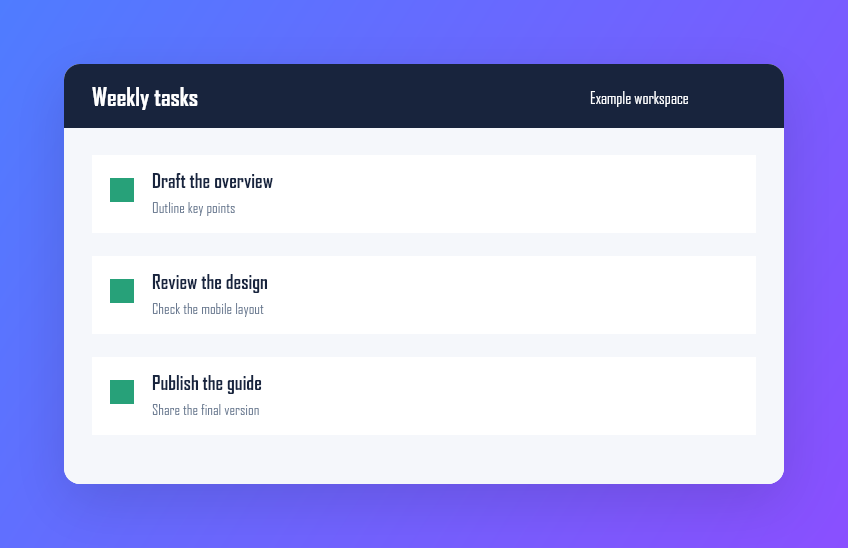
Save the 848 × 548 sample image(39,292 bytes), select Small photo example, and open the file. The result should be a JPG at 200 × 129 pixels with at most 20,480 bytes. In Chromium the sample came out at 5,902 bytes. Your browser may encode a different size. Check the result panel before downloading.
Why a kilobyte limit is harder than a pixel limit
Resizing to fixed dimensions is easy: you know the answer before you start. Hitting a file sizeis not, because the size depends on the image content as well as the settings. A face against a plain white wall compresses to a fraction of what a busy outdoor background needs at the same dimensions and quality. That is why manually dragging a quality slider is such a frustrating way to do this — you are guessing at a relationship you cannot see. The tool instead searches for the answer, then reports what it found.
How the size target is reached
Two stages. First it binary-searches the JPEG quality at your chosen dimensions, repeatedly halving the range to converge on the highest quality that still fits, which finds a good answer in a handful of encodes rather than dozens. If even the lowest quality is still too large — common with a high-resolution camera photo against a detailed background — it reduces the dimensions by 15% and searches again, for up to six rounds. Being straight about the edge case: if it still cannot reach the target after that, it hands you the smallest result it managed and says so, rather than reporting a success it did not achieve.
Preset dimensions and targets
| Preset | Pixel limit | Size target | Intended for |
|---|---|---|---|
| Small photo example | 200 × 230 | 20 KB | Processing example, not an official requirement |
| Small signature example | 280 × 120 | 10 KB | Processing example, not an official requirement |
| Custom | You set it | You set it | Any portal with its own published limits |
Check the minimum, not just the maximum
This is the mistake worth avoiding. Most people search for how to get a photo under a limit, but many portals publish a range with a floor as well as a ceiling — and a file below the floor is rejected just as firmly as one above it. Current SSC applications can require a live photograph, while the 2026 JEE Main and NEET UG bulletins require both a scanned photo and separate live capture. Where a file range is specified, aim comfortably inside it using the custom preset rather than reflexively targeting the smallest possible file. Specifications also change between sessions, so confirm both numbers against the current official notification for your exam rather than a coaching blog.
Getting a photo that passes and still looks like you
- Crop tightly to head and shoulders before resizing, so the bytes go on your face rather than the room.
- Use a plain light background. It compresses dramatically better and is usually required anyway.
- Shoot in even light, avoiding harsh shadow, which adds detail the encoder has to spend bytes on.
- Aim inside the range if one is published, rather than at the smallest achievable file.
- Check the size badge against both ends of your portal's limit before you upload.
Why this runs on your device
A passport photograph and a handwritten signature are among the most sensitive files an applicant handles. Together they are most of what is needed to impersonate someone on a form. Uploading them to a free compression site means an unknown server holds a copy indefinitely, and during application season those sites receive millions of them. Locally selected files are processed on a canvas in your browser; optional cloud import connects to its provider. Keep your originals somewhere private too, rather than in a shared photo library.
The rest of the application
For a signature that needs exact pixel dimensions rather than a size target, thesignature resizer handles exact pixel dimensions and thesignature compressor handles the kilobyte ceiling. For a formal document photo with fixed proportions, use the passport photo maker. Theexam tools hub collects everything else these forms demand, including theage limit calculator for eligibility.
How to Resize an Image Under 20KB
- Select a Preset or Custom Limit: Choose a clearly marked size example or enter the kilobyte ceiling, optional minimum and pixel cap from your current portal requirements.
- Drop or Upload Your Image: Select your JPG, PNG, or WebP photo or signature. The canvas engine immediately downscales and binary-searches JPEG quality.
- Verify File Size & Download: Compare the original and generated previews. Check the achieved JPG format, pixel dimensions and file size; download is enabled only when the entered limits pass.
Supported Inputs & Output Formats
| Type | Format | Details & Handling |
|---|---|---|
| Input | JPG, PNG, WebP | Source photo or scanned signature up to 20 MB. Large images may take longer to process. |
| Output | Target JPEG (.jpg) | JPEG with its actual pixels and bytes shown. A result outside your entered range cannot be downloaded from the checked button. |
Common Practical Use Cases
- Government & Recruitment Exams: Prepare a scanned photo only when your current application portal accepts file upload and its published range fits your target.
- Online Signature Uploads: Resize scanned or smartphone-captured signatures down to 10 KB or 20 KB to meet upload limits.
- College & University Admissions: Prepare identity photos and supporting ID card images for academic portal registrations.
Important Limitations & Technical Boundaries
- Target Ceiling (Not Fixed Size): Compresses to fit at or below the target KB limit (e.g. 17–20 KB for a 20 KB target). It does not pad dummy bytes to force an exact number.
- Portal Minimum Ranges: Enter a minimum if your current notice specifies one. The tool checks encoded bytes, but cannot certify photo composition or portal acceptance.
- Plain Light Background Recommended: Busy or complex backgrounds demand more encoding bytes. Use a plain white or light background and crop close to the face.
- JPEG Format Output: Encodes exclusively to JPEG. Confirm that your destination accepts that format.
Frequently Asked Questions
How do I get a photo under 20 KB for free?
Choose a size example or enter a custom ceiling and optional minimum, then add your image. The tool checks the generated JPG format, pixels and entered size range. Download is available only when those checks pass; check other current portal requirements yourself.Is my photo uploaded to a server?
Locally chosen images are processed in your browser. Optional cloud import connects to its provider; site analytics and ads may also make network requests.Does it always manage to hit the target size?
No. The tool searches JPEG quality and may reduce pixel dimensions. If the result falls outside your entered KB range, it explains the issue and disables the checked download.Careful: is there a minimum size as well as a maximum?
Sometimes. Enter the current portal minimum when one is specified; the tool checks it alongside the ceiling. Some applications require a separate live photo instead of a prepared upload.What dimensions do the examples use?
The small-photo example caps at 200 by 230 pixels and targets 20 KB; the small-signature example caps at 280 by 120 pixels and targets 10 KB. Neither is an official portal preset. Custom lets you enter your own target and pixel cap.Why do exam portals enforce these limits at all?
Recruitment boards process millions of applications in short windows, often on the final day. Small images keep the upload fast on a poor connection, reduce storage and bandwidth, and let admit cards be generated quickly. The limits are about throughput rather than image quality.What format does it output?
JPEG. Check that your destination accepts JPG/JPEG before submitting.My photo looks blocky at 20 KB. What can I do?
Crop tightly to the face first, so the available bytes describe the subject rather than background. A plain light background compresses far better than a busy one. And check whether your portal actually allows a larger file, since many permit 50 KB or more.